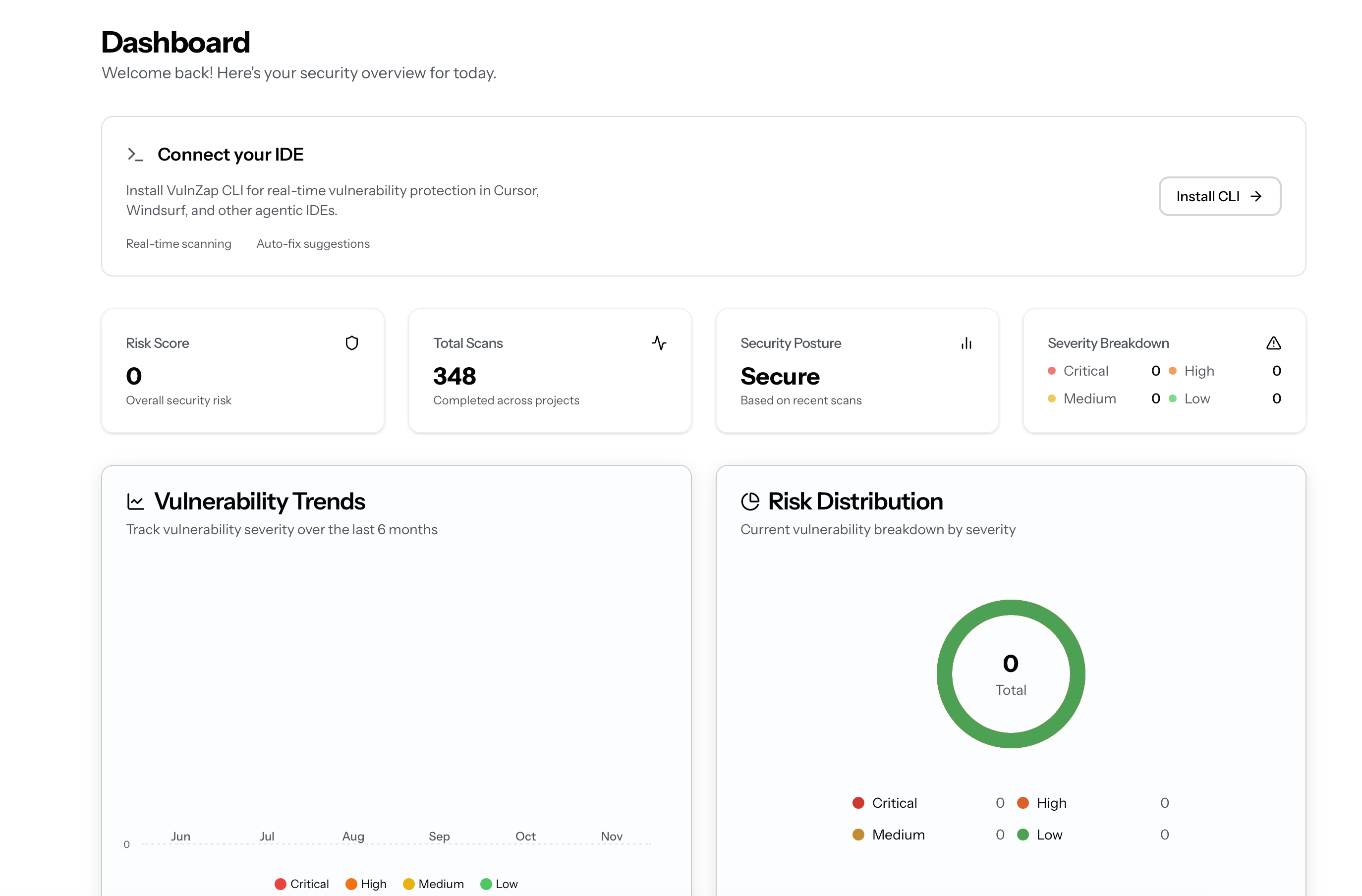
Overview The VulnZap dashboard provides a centralized view of your security posture, scan history, vulnerability findings, and team management.
Access the dashboard at: vulnzap.com/dashboard
Main Dashboard Security Overview The landing page displays your current security posture:
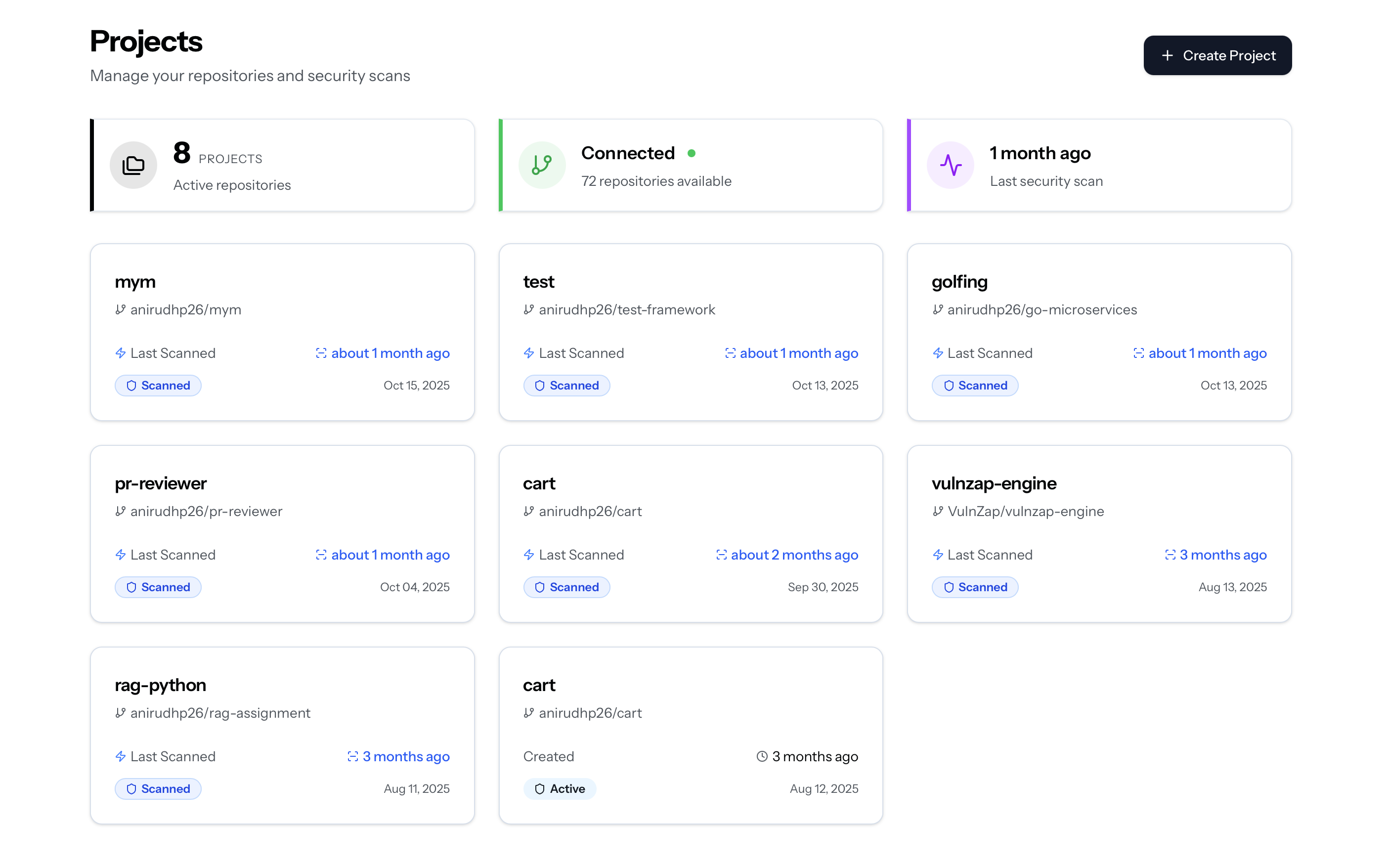
Projects Section Managing Projects View and manage all connected repositories:
Adding a Project Pre-requisite Authenticate with GitHub and grant repository access -> settings
Click 'Add Project'
Navigate to Projects → Add New Project
Select Repository
Choose from available repositories
Run Initial Scan
VulnZap performs an initial baseline scan
Free tier : 5 projects maxStandard tier : Unlimited projects
Project Details Click any project to view detailed information:
Tabs: Overview
Findings
Scans
Settings
Risk score trend
Vulnerability breakdown
Recent scan history
Quick actions (Scan Now, View Findings, Settings)
All vulnerabilities for this project
Filter by severity, status, file
Bulk actions (Fix All, Mark as False Positive)
Complete scan history
Diff views between scans
Download reports (PDF, JSON, CSV)
Scan configuration
Notification rules
Integration settings (CI/CD, webhooks)
Archive or delete project
Scans Section Scan History View all scans across all projects:
Filters:
Date range
Project
Scan type (inline, full repo, CI/CD)
Status (completed, in progress, failed)
Scan Details Click any scan to view detailed results:
Information Displayed:
Scan metadata (timestamp, duration, files analyzed)
Vulnerability summary
File-by-file breakdown
Patch recommendations
Example Scan Result: Scan ID: scan_abc123xyz Project: my-app Status: Completed Duration: 28.4s Files Analyzed: 342 Lines of Code: 45,231 Findings: ■ Critical (2) └─ SQL Injection in src/db/queries.ts:45 └─ Command Injection in src/utils/exec.js:12 ■ High (5) └─ XSS in src/components/UserProfile.tsx:78 └─ Path Traversal in src/api/files.ts:34 └─ ... (3 more ) ■ Medium (8) ■ Low (3)
Comparing Scans Compare two scans to see what changed:
Select Base Scan
Choose the earlier scan as baseline
Select Comparison Scan
Choose the newer scan to compare
View Diff
See added, fixed, and unchanged vulnerabilities
Diff View: + Added (3): + Critical: XSS in login.tsx:23 + High: CSRF in api/auth.ts:56 + Medium: Weak crypto in utils/hash.js:12 - Fixed (5): - Critical: SQL Injection in queries.ts:45 - High: Command Injection in exec.js:12 - ... (3 more) ~ Unchanged (8): ~ Medium: Missing rate limiting ~ Low: Insecure cookie flags ~ ... (6 more)
Use scan comparison before deploying to ensure you haven’t introduced new vulnerabilities.
Findings Section Vulnerability List All detected vulnerabilities across all projects:
Columns:
Severity (Critical, High, Medium, Low)
Type (SQLi, XSS, Path Traversal, etc.)
File and line number
Status (Open, Fixed, False Positive, Ignored)
Actions (View, Fix, Ignore)
Filtering: ┌─────────────────────────────────────────┐ │ Filter Findings │ ├─────────────────────────────────────────┤ │ Severity: [All] [Critical] [High] ... │ │ Status: [All] [Open] [Fixed] [Ignored] │ │ Project: [All] [my-app] [api-server] ..│ │ Type: [All] [SQLi] [XSS] [CSRF] ... │ │ Date: [Last 7 days] [Last 30 days] ... │ └─────────────────────────────────────────┘
Finding Details Click any finding to view comprehensive information:
Overview
Code Context
Recommended Fix
Learn More
Vulnerability Summary:
Severity and OWASP classification
CWE reference
Exploitability score
Affected code location
Example: Type: SQL Injection Severity: Critical (CVSS 9.8) OWASP: A03:2021 - Injection CWE: CWE-89 Exploitability: 95/100 (Very High) File: src/db/queries.ts Line: 45 Function: getUserById()
Vulnerable Code: export function getUserById(id: string) { const query = `SELECT * FROM users WHERE id = ${id}`; return db.execute(query); }
Data Flow: Source: req.params.id (user-controlled) ↓ Flow: Direct string interpolation ↓ Sink: db.execute() (SQL execution)
Secure Implementation: export function getUserById(id: string) { const query = 'SELECT * FROM users WHERE id = ?'; return db.execute(query, [id]); }
Changes:
✅ Parameterized query prevents SQL injection
✅ User input properly escaped
✅ Same return type (tests still pass)
Apply Fix Automatically Why This Matters:
SQL injection allows attackers to manipulate database queries, potentially leading to:
Unauthorized data access
Data modification or deletion
Authentication bypass
Remote code execution (in some databases)
Exploit Example: GET /users/1' OR '1'='1 Resulting query: SELECT * FROM users WHERE id = '1' OR '1'='1' # Returns all users instead of just id=1
References: Bulk Actions Handle multiple findings at once:
Select findings (checkbox or Ctrl+Click)
Choose action:
Fix All : Apply all recommended patchesMark as False Positive : Remove from active findingsIgnore : Suppress warnings (with reason)Export : Download as CSV/JSONAssign : Assign to team member
Marking as “False Positive” requires justification for audit purposes.
API Keys Section Managing API Keys Create and manage programmatic access tokens:
Key Information:
Key name and description
Created date
Last used timestamp
Permissions scope
Status (Active, Revoked)
Creating a New API Key
Click 'Create API Key'
Navigate to Settings → API Keys → Create
Configure Key
Name : Descriptive identifier (e.g., “CI/CD Pipeline”)Description : Optional notesScope : Full access or read-onlyExpiration : Never, 30 days, 90 days, 1 year
Copy Key
⚠️ Important : Copy the key immediately - it won’t be shown again
Store Securely
Store in environment variables or secrets manager, never in code
Example Usage: export VULNZAP_API_KEY = "vzap_abc123..." vulnzap scan
Revoking Keys Immediately invalidate compromised keys:
Select the key
Click “Revoke”
Confirm action
All requests with this key will fail immediately
Rotate API keys every 90 days for security best practices.
Billing Section Current Plan View your subscription details:
┌────────────────────────────────────────┐
│ Current Plan: FREE                     │
├────────────────────────────────────────┤
│ Package Scans: 2,547 / 5,000          │
│ Line Scans: 8,923 / 10,000            │
│ API Access: Not included               │
│ Data Retention: 7 days                 │
│ Projects: 3 / 5                        │
└────────────────────────────────────────┘
Usage Metrics Track consumption across billing period:
Charts:
Package scans per day
Line scans per day
API calls per day (paid plans)
Storage usage
Alerts: You’ve used 89% of your monthly line scan quota. Consider upgrading to STANDARD for unlimited scans.
Upgrade Plan Compare plans and upgrade:
Feature Free Standard Scale Enterprise Package Scans 5,000 Unlimited Unlimited Unlimited Line Scans 10,000 100,000 500,000 Unlimited API Access ❌ ✅ ✅ ✅ Retention 7 days 30 days 90 days 365 days Support Community Email Priority Phone + SLA Price $0 $19/seat/mo $79/seat/mo Custom
Upgrade to Standard Unlock unlimited package scans and API access
Team Management Team features are available on Standard plans and above.
Team Members Invite and manage team access:
Roles:
Owner : Full access, billing managementAdmin : Full access, no billingMember : View and fix findingsRead-only : View findings only
Audit Trail View all team activity:
2025-10-19 14:32:11  user@example.com  Created API key "CI/CD Pipeline"
2025-10-19 13:45:03  admin@example.com  Fixed Critical finding in auth.ts
2025-10-19 12:21:34  user@example.com  Ran full repo scan on "my-app"
2025-10-19 09:15:22  admin@example.com  Added project "api-server"
Exportable for compliance audits. Notifications Configure alert preferences:
New Critical/High findings
Scan completion
Weekly summary reports
Billing alerts
Post notifications to Slack channels: 🚨 VulnZap Alert Critical vulnerability detected in my-app SQL Injection in src/db/queries.ts:45 [View Finding] [Apply Fix]
Send events to custom endpoints: { "event" : "finding.created" , "severity" : "critical" , "type" : "sql_injection" , "project" : "my-app" , "file" : "src/db/queries.ts" , "line" : 45 }
Next Steps 

 Filters:
 Key Information: